
General Advice
Using ChatGPT for Social Media Posts

ChatGPT is a language model developed by OpenAI to respond to text-based questions that resemble those of a human. This AI can interpret and create a language with a high level of fluency and accuracy because it was trained on an extensive amount of text data. Some of the key abilities of ChatGPT include responding to queries, generating text in response to a command or question, and content creation. Overall, ChatGPT represents a significant advancement in the field of natural language processing.
Social media posts with ChatGPT
Social media has become an essential aspect of modern-day marketing, and it is increasingly important to maintain a robust presence on various platforms such as Instagram, Facebook, Twitter, and LinkedIn. With the assistance of ChatGPT, any industry can enhance its online presence and expand its reach through social media posting. This article will cover topics such as prompts to use, formatting into tables, considerations for different industries, and how to use ChatGPT for social media posting with the help of a step-by-step guide.
Using prompts in ChatGPT
One of the most significant advantages of using ChatGPT for social media is the ability to generate ideas quickly and instantaneously. By inputting a simple prompt or question, ChatGPT can generate a variety of potential ideas and phrases for use in social media posts.
For example, we can input a prompt such as “Write a social media post for my newly opened cake bakery. Keep it short and simple. Use hashtags and emojis” and ChatGPT will provide a response like the one below.

The key is to use the correct prompts, keywords, and phrases. Other prompts that could be used include “What are the latest industry trends?” “What makes my product unique?” and “Create a funny and catchy social post for my bakery.” We can also use keywords such as “inspirational,” “sweet,” “short,” and “authentic” to make the output given by ChatGPT more unique.
Use table formatting in ChatGPT
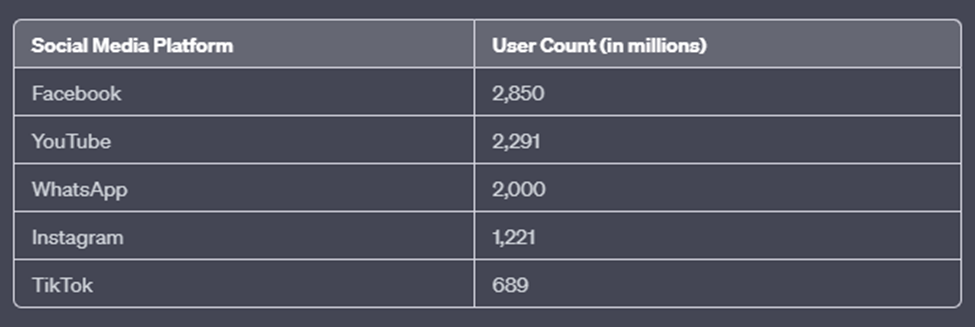
ChatGPT offers various formatting options, and one way to organize the output is to use a table format. Tables are not only useful for readability but also for exportability. To generate this output, you only need to insert the phrase “and format it in a table,” and ChatGPT will provide the output in a table format.

For example, if we ask ChatGPT to “write about the five most popular social media platforms and their user counts in a table format,” it will provide a response in a table format, as shown below.
What factors should you consider when using ChatGPT in different industries?
When using ChatGPT for social media posts, it is essential to consider the characteristics of different industries. When inputting queries into an AI model, we must consider the appropriate tone. For example, social media posts for an amusement park should have a more fun and creative tone, while a vehicle repair company may require a more technical tone.
Additionally, different industries follow specific privacy policies, rules, and regulations. Therefore, social media posts should comply with all these requirements to ensure they are appropriate for the industry.
Important steps to create social media content with ChatGPT
There are several steps to follow when creating a creative yet informative social media post using ChatGPT.
Step 1: Gather information about your company or product, and familiarize yourself with the rules, regulations, and policies that must be followed.
Step 2: Identify the main points to be covered in the post.
Step 3: Select a topic for the post and write a suitable prompt to input.
Step 4: Input the prompt into ChatGPT.
Step 5: Evaluate the generated output. If it is not suitable, you can ask the AI to regenerate the response or input your prompt again by making adjustments.
Step 6: Select the most useful and appropriate output provided by ChatGPT.
Step 7: Use the content to create the social media post, incorporating other relevant multimedia elements.
While these fundamental steps can be helpful for creating social media content quickly, there are also more advanced methods that can be used to enhance the quality and efficiency of social media postings.
Advanced use of ChatGPT
- ChatGPT has the capability to generate longer content, such as blog posts. This can be achieved by using the phrase “write a blog post about <topic>,” which will generate longer and more informative pieces of content.
- ChatGPT also offers personalization and segmentation capabilities, enabling you to generate unique messages for different audiences within your company. For instance, we could request, “write a social media post for adults about less sweetened snacks,” and ChatGPT would provide a response like the one below.

We can input the same query but this time targeting children. For example, “Write a social media post for children about snacks.”

- The ability to create multilingual content is one of the remarkable benefits of using ChatGPT. It enables you to attract followers and customers from different countries. With this capability, you can input prompts such as “Write a social media post in Spanish promoting my bakery – FoodBud,” and ChatGPT will generate a response in the specified language.

Conclusion
Using ChatGPT to generate content and social media posts can be a valuable tool for any kind of business. It can help to improve reach, public preference, and online engagement. Utilizing ChatGPT’s capabilities such as consuming prompts, organizing content into a more readable format, considering different industries when creating posts, and using multiple languages can take business development to the next level. It is essential to stay ahead of the competition by growing with technology.